New Facebook features Breakdown

by Jimmy Mackin

September 15, 2011  |  Social Media

Subscribe Button

Overview:

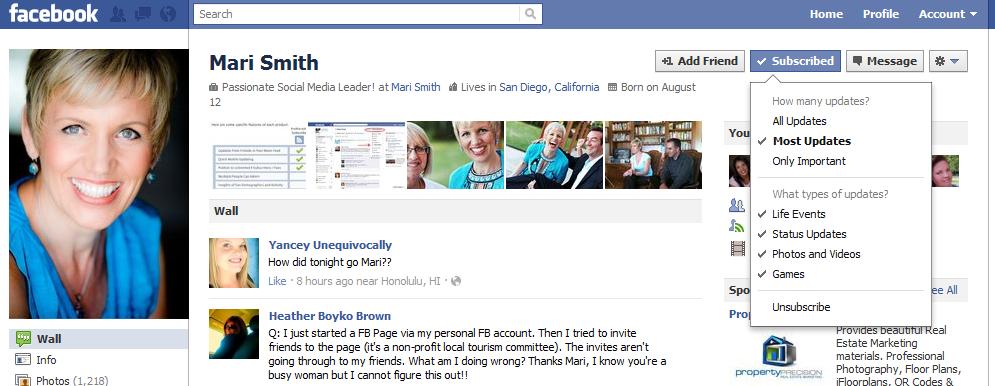
Facebook’s new subscribe button allows users to subscribe to public posts from non-friends and business profiles.  Additionally users can control the amount of information they receive from their subscriptions.

Users can also subscribe to their friends updates.  They can also filter how much information they receive from their friends – All Updates, Most Updates, or Only Important Updates.

Highlights

  • You must enable this feature to activate it – here is the link 
  • This feature is only available for personal profiles and business profiles (not Facebook Pages).
  • Non-friends will only have visibility to your public posts
  • To manage your subscriptions, visit your personal profile and click on the “subscriptions” link below friends
  • You can control the types of updates you receive by simply hovering over the list
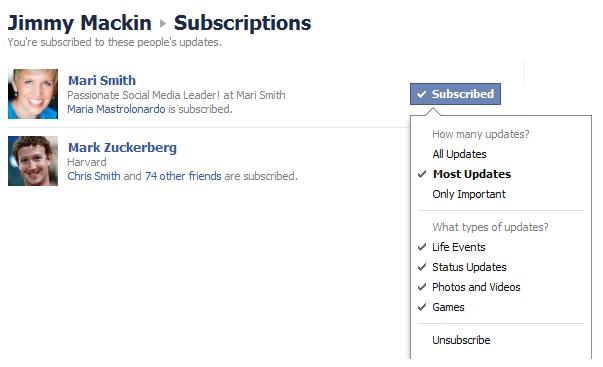
Here is a definition of the types of updates from Facebook’s blog.

  • All updates: Everything your friend posts
  • Most updates: The amount you’d normally see
  • Important updates only: Just highlights, like a new job or move

Important Note:  When you send a friend request to someone, you are automatically subscribing to their public post.  Users have the ability to control who they share their post with – public, friends, or custom. (Thanks Mari) .  To learn more about this feature – visit Facebook’s blog post.

Smart List
Overview:

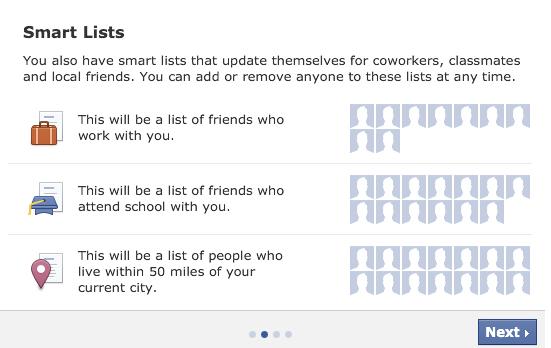
Smart lists - You’ll see smart lists that create themselves and stay up-to-date based on profile info your friends have in common with you–like your work, school, family and city.

Facebook analyzes your work history, school, family and location to determine who will be added to your Smart List.

Highlights

  • List will be bookmarked on homepage
  • Smart List will begin rolling out this week
  • Will be available for mobile in a few weeks
  • You have the ability to add or remove people from this list.
  • Using this feature is optional.

Lists versus Groups

In groups, everyone can see everything. If John posts an update in a group, all group members have visibility to that post.

When you share a post to a list, that post is only visible to people on that list. If your friends are not on that list, they will not see that post.


Facebook Usernames Available to All Pages

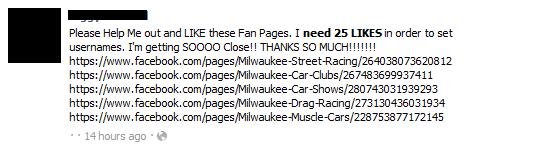
In the past, only pages with 25 Likes could set up their custom username.

Facebook now allows every page (even those with less than 25 likes) to set up a username.

Say goodbye to post like these!
If you have create a page and do not have your username set up – visit the username page.
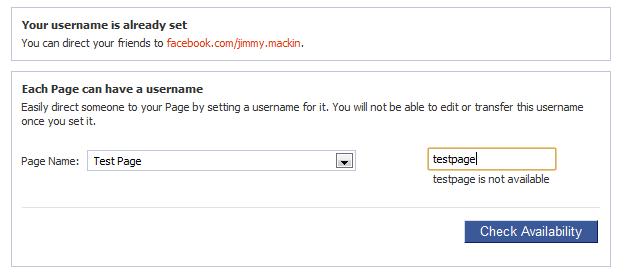
Important Note: Once you select your username, you cannot change it. Try to keep it short and simple.


Fewer Emails from Facebook
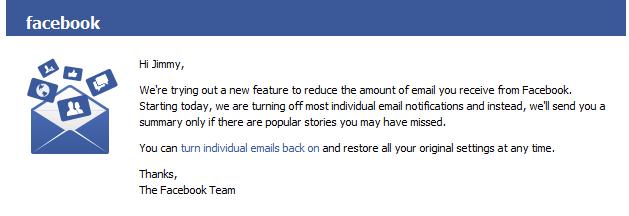
To avoid overloading users with email notifications anytime something happens, Facebook will begin to email you a daily summary of the “less important” things.

To activate the email frequency feature, visit the notifications page  and select the check box (see image below)
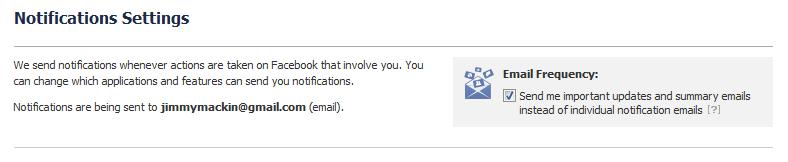
If you’d like to customize your notification settings, you will have to disable this feature.


Additional Updates

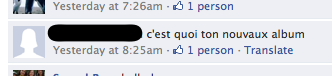
Translate Button

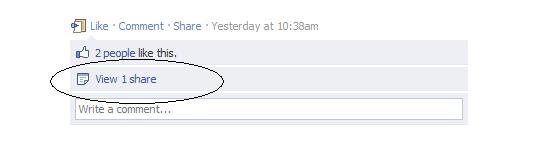
View Shares

When you share a link, post a video, or upload a photo – you can now view who else has shared it.
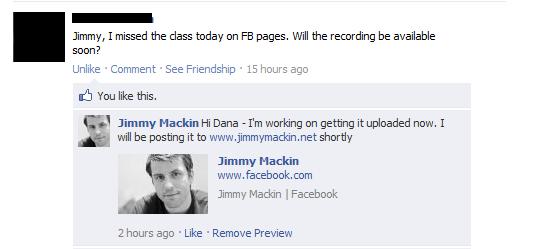
Link Preview
 

If you’re interested in learning more about recent Facebook changes, I recommend that you read Katie Lance’s 4 Important Facebook Changes You Need to Know.

, , , , ,
Jimmy Mackin

About Jimmy Mackin

Jimmy Mackin is the Chief Frugylist for The Frugyl Club. Learn more about The Frugyl Club Twitter: @JimmyMackin

View all posts by Jimmy Mackin
Subscribe to all posts by Jimmy Mackin

59 Responses to “New Facebook features Breakdown”

  1. Emma Says:

    Thanks Jimmy! I’ve been hoping to find this all in one place. Whew! A lot of changes. Which one do you like best (or not)?

    Reply

  2. Jeremy Rivera Says:

    Soo happy they made an update to notifications, I was getting bombarded from every app on every page I built!

    Reply

  3. Randy Elliott Says:

    Went to FB class today in Pleasanton, CA taught by Nicole Nicolay and found out about these new features. Excited to implement a few of them already.

    Reply

  4. Gabrielle Jeans Says:

    A lot of people would be grateful for the subscribe button. It eliminates the friend request feature.

    Reply

  5. Atim Ukoh Says:

    I definitely love the fact that you don’t need 25 likes anymore to change your username. I hosted a webinar yesterday and people were complaining about this so thankfully I can email them and say well you don’t need that anymore.

    Reply

  6. Barbara OToole Says:

    Hi, yeah, interesting thing happened yesterday. When I got the news that I could set custom usernames on my “low-like” pages, I rushed in to set them on 3 pages. It let me do the first one just fine. When I tried to update the second page, it said “we’re sorry” there “was an error” and that I should try back later. When I tried to update the third page, same thing. Now, when I try to go in and customize usernames for either of those two pages today, it says the page “does not have enough likes” at this time.

    Reply

  7. VA Says:

    I would like to have to option to edit a post or to turn off a post I’m not longer interested on receiving notifications…

    Reply

  8. Paul Says:

    I chose a custom URL for one of my business pages and then created a new business page and tried to get a custom URL for it and it is requiring 25 likes. I did some research and it seems that Facebook only allows 1 free URL a year for your business page custom URL. Otherwise you still need 25 likes.

    Reply

  9. Steve Says:

    Thank you for the very informative article, Jimmy. Question: Can someone who I blocked on Facebook still subscribe to my Profile Updates if I allow subscribers? Thanks again.

    Reply

  10. Jimmy Mackin Says:

    Steve,

    You can only subscribe to a persons profile if it is visible to you.

    When you block someone, your profile is no longer visible to that person.

    http://www.facebook.com/help?page=841

    Of course, if your updates are public, they could simply log out of Facebook and search your profile and view all the public updates.

    Reply

  11. Susan Greene Says:

    Good summary of the new features. I have two questions about recent changes that you didn’t cover:

    1) It used to be I could see who was awaiting a Friend confirmation from me. Now I can’t find where they’re listed. (I know I had a bunch, but they’ve all disappeared.) Do you know where the Friend button has gone?

    2) It used to be I could add a caption any time to any photo I’ve posted. Now, the caption option is offered only when first uploading the photo and sometimes not even then. Without the ability to add a caption, you’re limited to commenting. So, how do you add a caption to a photo you’ve posted?

    Thank you in advance for your answers.

    Reply

    • Jimmy Mackin
      Jimmy Mackin Says:

      Hi Susan,

      If you go to http://www.facebook.com/reqs.php you can see all of your friend requests. (they have moved this and it’s difficult to find – you are going to want to use that URL to get the page directly)

      It does not appear that you can add a caption once you upload the photos anymore. Before you upload the photos or album – you may want to add the description as a status update, then click “add photo”, then upload the photos. That should work.

      Thanks for dropping by

      Jimmy

      Reply

  12. Native English Speaker Says:

    Please use correct English. It is “Fewer Emails” not “Less Emails”. People will learn from you and it helps to set an example.

    Reply

  13. Bob Gordon Says:

    When a f/r is sent to someone and they deny it, they get the question “do you know this person outside of FaceBook?” If they click no, they have a ban put on the sender for 7 days from sending f/r to anyone. Now in all honesty, most of us do not know each other except for playing this game, so maybe that feature or question should be removed. I have a friend who was just banned and found others that have had the same problems. I appreciate your attention to this matter and look forward to it being straightened out!!

    Reply

  14. Laurie Says:

    I have the new lists, but not the new notification feature. They must still be rolling it out?

    Reply

  15. Jimmy Mackin
    Jimmy Mackin Says:

    I wish I could help Bob but I’ve never come across that issue. I don’t send Friend Requests unless I know the person or know of the person. I will send a personal message along with a friend request.

    Reply

  16. Punstressak Says:

    If you have to enable the subscribe feature, how come I’ve already been subscribed to all 300 of my current friends? I really hope the guy who writes the code for what is currently known as “Better Facebook” finds a new name he can publish under soon (they’re suing him) so he can keep on correcting their screw-ups.
    Oh, and BTW, it IS fewer, not less. Native English Speaker was very polite in his request and there was no need to call him an ass. Makes me think of the saying about showing your intelligence in the use of such language.

    Reply

    • Jimmy Mackin
      Jimmy Mackin Says:

      That’s a great questions. You don’t have to use the subscribe feature to subscribe to other peoples updates – you do have to use it if you want to give other people the ability to subscribe to your updates.

      Reply

    • Kelly Says:

      couldn’t agree more, Punstressak. Both with the grammar (which is important, and not something to scoff about) and with the sadness at the demise of “Better Facebook” which allowed the user, and not stupid nameless idiots who don’t know us, to decide how things should be laid out and what was a priority.

      This sucks.

      Reply

  17. bob Says:

    I wish they’s STOP BREAKING EVERYTHING we use, and quit with these useless features. FB is going to be the next myspace at the rate they are going.

    Reply

  18. Kelly Says:

    I loathe “updates” where I don’t have an option to say “I HATE WHAT YOU DID” and get me back to seeing ALL the updates I wanted to see, with prioritization I CHOOSE (not you, who don’t know what I would choose).

    And I HATE that Better Facebook, which is SO MUCH BETTER, was broken by you.

    Reply

  19. suzy Says:

    funny my facebook page doesnt look anything like that at all there is no ADD FRIEND. SUBSCRIBED,OR MESSAGES BUTTON along the top of mine all it has is update srtatus add photo, ask question, why cant fb leave things alone, never heard of ” if it aint broke, then dont fix it” ??? getting so fed up with all these changes as its making my page useless to use !!!!!!

    Reply

  20. Abigail Says:

    I hate these changes as well.
    Why can I no longer separate my ‘game’ news from the other events. Looking at my news feed now I can tell you that FB has absolutely NO clue what is important to me and what is not!!!! I really RESENT someone else choosing what THEY think is important to me! Competition is on the way and you are going to lose many users when it gets here. Can you say GOOGLE +??? Just wait till those contracts start to run out!

    Reply

  21. Celeste Says:

    Leave Facebook as it was….Everyone hates it!!!!

    Reply

  22. ruben Says:

    What happened to impressions, knowing when people check your stuff out?

    Reply

  23. Deb Says:

    I am not a fan of the changes FB has made in this last mess. The only two I am moderately happy about is you can turn off chat and it stays off (finally!) and the subscribe button. However, they’ve jacked up the wall so badly and that ticker is beyond irritating, so why bother subscribing at all? G+ had my vote soon as I got an invite 6 weeks ago or so. More and more of my friends are migrating over there, and soon I will have no “need” for FB at all.

    Reply

  24. Tom Aikins Says:

    It seems like half the people like the changes and half don’t. About average for FB changes historically but there is now an alternative to FB called Google+ as we all know. I wonder if this will factor into the equation.

    Reply

  25. Brett Hughes Says:

    Facebook knows all! They are the ultimate in data collection and stereotyping. Bless their hearts.

    Reply

  26. Theresa Says:

    Is it still possible to add a personal message to a friend request on facebook? It’s helpful when adding people for games like Sorority Life who don’t know you. Thanks.

    Reply

  27. Katina Kennelty Says:

    I can understand why people would want LAN, but the more people play it and can connect with each other the more competitive it will likely get.Face-to-face might at a new layer to the gameplay but it’s also quite niche, so I rather would have this taken out of the equation. If it’s there and it doesn’t hurt the online game in anyway sure, if the game gets designed or gets influenced for/by LAN-gaming then I think that would be somewhat of a pity for the overall competitive scene.

    Reply

  28. Rickie Aiton Says:

    I have to say that for the past few of hours i have been hooked by the amazing posts on this website. Keep up the wonderful work.

    Reply

Trackbacks/Pingbacks

  1. Recente grote Facebook aanpassingen op een rij | Social Matters - September 21, 2011

    [...] over deze veranderingen is te lezen op het blog van Facebook en op dit overzichtsblog. Ik verwacht dat de komende dagen nog meer aanpassingen aangekondigd zullen worden, dus hou [...]

  2. InmanNext | New Facebook features Breakdown « Cyberqueen VA Solutions - September 23, 2011

    [...] Posted by Ana Lucia Consulting under virtual assistant Leave a Comment  http://next.inman.com/2011/09/new-facebook-features-breakdown/ Share this:TwitterStumbleUponDiggRedditFaceBook PageEmailLike this:LikeBe the first to like this [...]

  3. New Facebook features Breakdown | lftlinks - September 23, 2011

    [...] Source: http://next.inman.com/2011/09/new-facebook-features-breakdown/ [...]

Leave a Reply